Hi all,
I am using ubuntu 20.04, then the version of sumo is 1.12.0
i got several problems by installation of commonroad on linux. when I ran first tutorial about commonroad-search, there was an error " No module named 'commonroad’
", I checked the installation and there is no problem. “pip install commonroad-io” and “sys.path.append(’/home/zewen/anaconda3/envs/commonroad-py37/lib/python3.7/site-packages/commonroad’)” dont work for me.
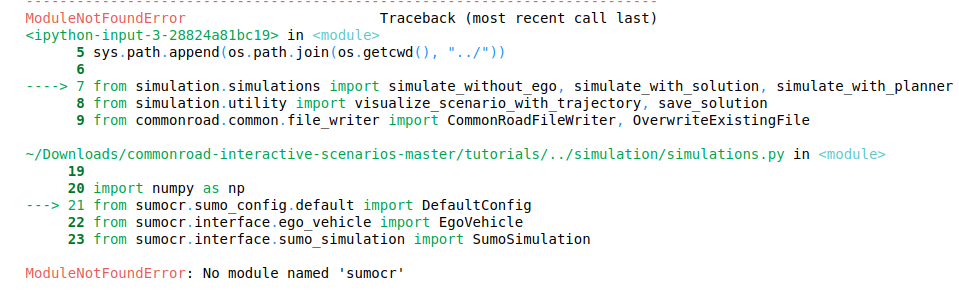
In addition, I also installed commonroad-interactive-scenarios and the following appeared when I ran Tutorial: Interactive Scenario Simulation.
These problems don’t exist on another computer (MacOS). But none of them can import SUMO under commonroad scenario designer to simulate.
Hope to get your help, thank you!
What is the concrete problem (the root problem)?
Is it related to commonroad-io, scenario-designer, interactive-scenarios, or sumo-interface?
Note: I have changed the name of your post and moved it to the scenario-designer category.
Please post always in the correct category so that other users of the forum can easily find the answers to the problem (this is not related to commonroad-search).
In the following I will try to answer the problem shown in the terminal (last picture):
The error seems to be a missing package - either libxkbcommon-x11 or libxcb-xinerama0 (both can be installed by sudo apt install [package_name]). See for reference here
The failing SUMO import is not solved by this, but at least the scenario-designer should start.
Hi Sebastian,
after installing the library, I still have the following problem on my Macbook.
zsh: segmentation fault crdesigner
Do you get further error messages?
Does this also occur when you start the Scenario Designer from the Python script or only when you start it from the command line?
fyi: I just published version 0.5 of the Scenario Designer (I don’t think that this error will solved by the release).
I got just one error messages (Weird, it was normal when I opened it for the first time), and then it occurres when i start both of these.
Unfortunately, I can only provide some general tips how you could solve the problem:
- execute the scenario designer from an IDE in debug mode, maybe you get some further error messages
- de-install and install qt again (I guess the problem is somehow related to qt)
- install everything in a new anaconda environment
- try it in a virtual machine