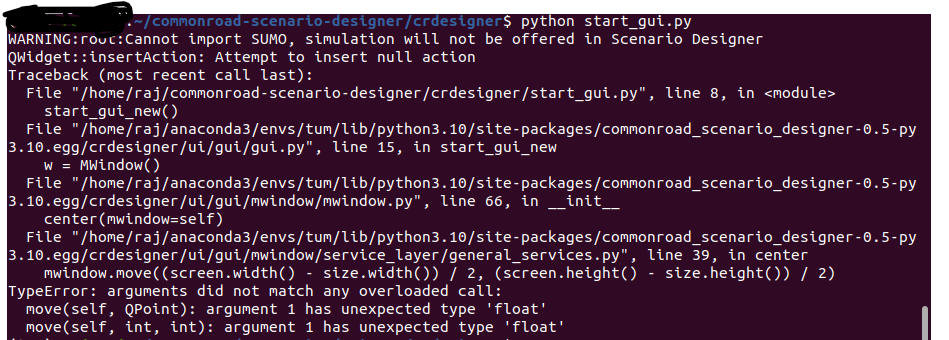
I’m trying to install the Scenario Designer and I followed the steps from README. But still meet an error when opening the GUI. I’m using Anaconda with Python version 3.7.
Am I missing anything?
Traceback (most recent call last):
File “crdesigner/input_output/gui/commonroad_scenario_designer_gui.py”, line 20, in
from crdesigner.input_output.gui.converter_modules.osm_interface import OSMInterface
File “/home/anaconda3/envs/cr37/lib/python3.7/site-packages/commonroad_scenario_designer-0.2-py3.7.egg/crdesigner/input_output/gui/converter_modules/osm_interface.py”, line 13, in
from crdesigner.map_conversion.osm2cr.converter_modules.cr_operations import export
File “/home/anaconda3/envs/commonroad/lib/python3.7/site-packages/commonroad_scenario_designer-0.2-py3.7.egg/crdesigner/map_conversion/osm2cr/converter_modules/cr_operations/export.py”, line 13, in
from crdesigner.map_conversion.osm2cr.converter_modules.intermediate_operations.intermediate_format import
ModuleNotFoundError: No module named ‘crdesigner.map_conversion.osm2cr.converter_modules.intermediate_operations’
Yes, you’re right.
I forgot to update the jupyter notebook
Thank you for notifying!
I will update it in the next days.
The conversion example here is already updated.
Can you upload the complete error traceback?
From what I can see in the picture, the error is not related to the SUMO warning at the beginning.
The warning indicates that SUMO cannot be found, e.g., the Python path is wrongly configured or you haven’t installed SUMO itself (SUMO cannot be installed via pip).
However, it should also work without a correctly-installed version of SUMO.